


In this comparison post, we explore the differences and similarities between EventKoi and The Events Calendar, and which one is more suitable for you.
A note on bias: EventKoi is made by us. Hence I am able to explain our product decisions and the trade-offs we made when building EventKoi. In contrast, I have no insight into the product decisions behind The Events Calendar as I did not build it.
Aside from that, this post attempts to be as unbiased as possible. I will share when The Events Calendar is the better option, and when EventKoi is.
What Is The Events Calendar?
The Events Calendar (TEC) is the most-installed events plugin on WordPress.org, originally built by Modern Tribe and now developed by LiquidWeb. It’s been around since 2009, has over 800,000 free active installs.
The free version includes month, day, and list calendar views, event creation with reusable venues and organizers, taxonomies, Google Calendar and iCal export, JSON-LD structured data for SEO, REST API endpoints, and block editor support for single-event meta blocks like datetime, venue, organizer, and price.
To get more features, you have to purchase the paid versions, which give you tickets, recurring events, custom fields, frontend submissions and more. The paid plugin costs $259-$599/year for 1 site license.
What Is EventKoi – The Events Calendar alternative
EventKoi (EK) was built by us, Lesley Sim and Ahmed Fouad. Prior to EventKoi, we built and sold Newsletter Glue, a popular block-first newsletter plugin for WordPress used by medium to large publishers globally. EventKoi carries that block-first, modern-WordPress philosophy into events.
We built EventKoi because we felt the existing events calendar plugins on the market were old, bloated and rigid. Instead, we wanted EventKoi to be modern, performant and flexible.
We believe that events plugins don’t operate in a vacuum. Instead, they are intertwined with form plugins, page builders, membership plugins, and so much more. This means our plugin needs to be fast so that it doesn’t slow down a WordPress site that already has 20+ plugins installed, it also needs to be flexible with lots of shortcodes, metakeys, filters, hooks, and more so that people can build the events calendar they need without feeling limited.
The free version, EventKoi Lite, is available on WordPress.org. And the Pro version starts at $99/year for a single site license.
EventKoi Pro includes:
- Recurring events with per-instance overrides
- Custom fields
- Frontend submission forms
- Stripe and WooCommerce ticketing
- RSVPs with QR code check-in
- Month, week, day, and list calendar views
- Native page builder support for Bricks, Beaver Builder, Divi, and Elementor: with dynamic tags, native modules, and custom query loop integrations for each
- Block editor support including calendar, list, and event query loop blocks
- A one-click migration tool from The Events Calendar
EventKoi vs The Events Calendar comparison guide
The Events Calendar is the best choice if you:
- Need to import large numbers of events from external sources at scale (Meetup, Eventbrite, Google Calendar, ICS feeds).
- Run a large news, city, university, or directory site with hundreds or thousands of events and multiple editors.
- Need ticket seating features.
EventKoi is the best choice if you:
- Want one plugin covering all features without juggling four to six separate plugins and licenses.
- Build with a page builder. Especially Bricks, Elementor, Beaver Builder, or Divi. EventKoi’s dynamic tags and event query loops are first-class in all four.
- Use the WordPress block editor or a full site editing (FSE) theme and want events that feel native to the modern editing experience.
- Care about front-end performance, especially with lots of recurring events.
Setup & ease of use
The Events Calendar’s admin uses the traditional WordPress meta box approach. Event details split across multiple boxes on the post edit screen, a long settings page with many tabs. This might feel familiar to users who have used WordPress for over a decade, but can feel dated.
EventKoi’s admin is modern and intuitive. Event creation happens on a single consolidated screen rather than across meta boxes. For a brand new user, EventKoi will generally be faster to set up and embed a first calendar.

Block editor and block templates
The Events Calendar started in 2009, fourteen years before full site editing existed and nine years before Gutenberg shipped. It was built for the classic editor with PHP-rendered meta boxes. When the block editor arrived, blocks were added as a layer on top of the existing system.
The Events Calendar ships with nine blocks which are simply wrappers around individual event meta – datetime, venue, organizer, price, category, tags, links, website. One of them is literally named classic-event-details, a block whose entire purpose is to embed the classic meta box experience inside the block editor for users who didn’t want to leave it behind.
In contrast, EventKoi was started in 2025 with full site editing already mature in WordPress. As a result, we have:
- A calendar block that has the same calendar view in the editor as on the front end.
- An event query loop block for building custom event listings inside any post, page, or FSE template. Create any design you want and make powerful queries to build highly specific event lists.
- Over fifty block bindings covering nearly every event field — title, datetime, location, capacity, capacity remaining, ticket price, RSVP counts, sold-out status, custom fields, and more. Bind any of these to any core block (paragraph, image, button, heading) to build event templates without writing code or installing a page builder.
- FSE-native single event and single calendar templates that work with any block theme out of the box, and that you can customize entirely in the Site Editor.
If you run a block theme, use the Site Editor, or care about building event layouts with native WordPress blocks instead of a page builder, EventKoi will feel like it was designed for the way you already work.
Calendar views & frontend
The Events Calendar’s free plugin includes month, day, and list views. Week, photo, map, summary, venue, and organizer views require Events Calendar Pro.
EventKoi includes month, week, day, list, and search views. There is automatic timezone picker, 12 and 24 hour clocks, as well as search functions. You can filter the calendar and subscribe to it.
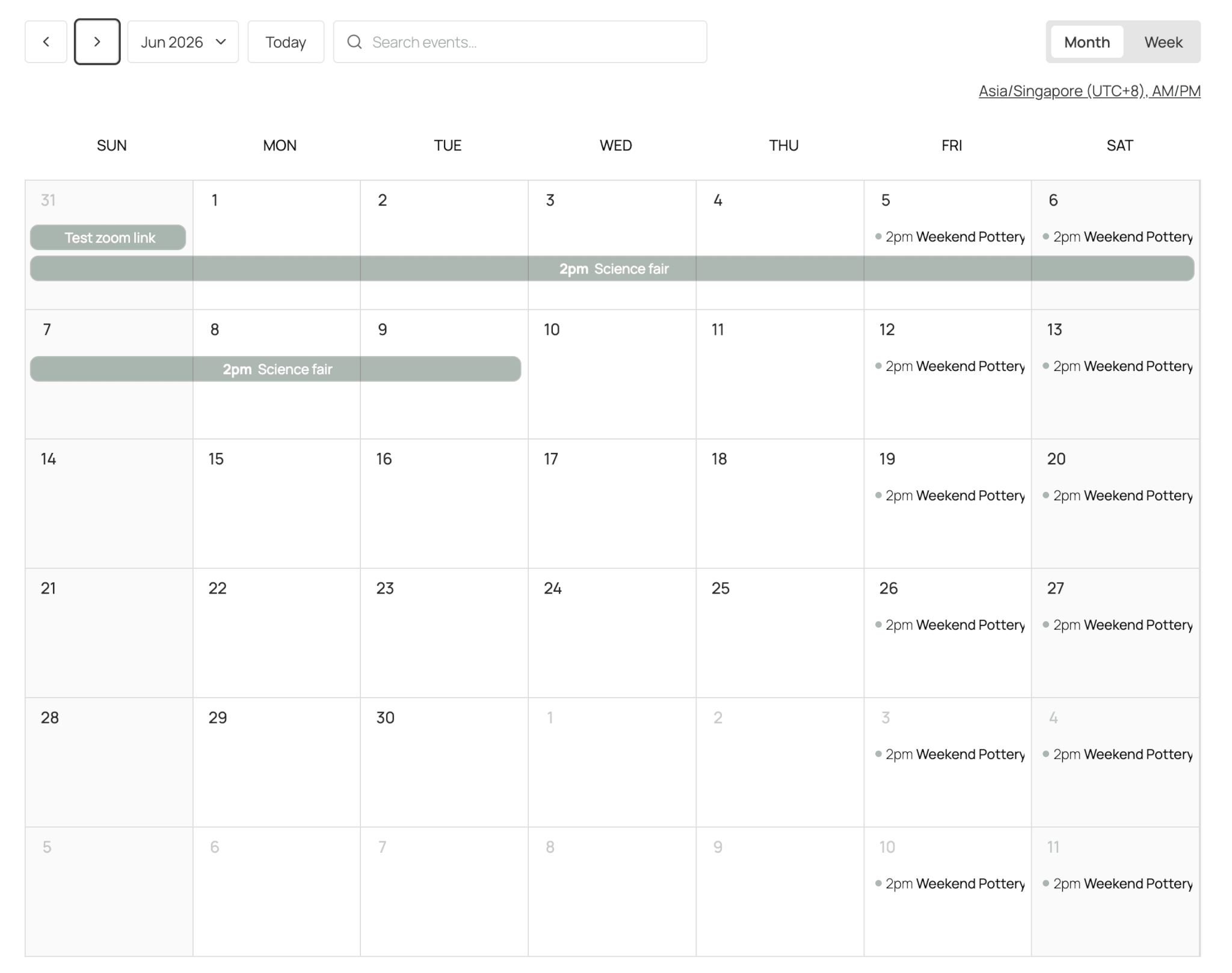
The Events Calendar uses a server-rendered, AJAX-enhanced approach.
EventKoi’s calendar is React-rendered using FullCalendar (with custom upgrades), so view switching is instant and the calendar feels like a single-page app.
Recurring events & performance
This is the area where EventKoi differs most significantly from The Events Calendar.
The Events Calendar creates individual posts in the database for each occurrence of a recurring event. This causes performance and SEO concerns as thousands of posts are created over time.
EventKoi stores recurring events as a single post with one or more RRULE rules. Recurring instances are computed and materialized on demand. This means that instead of thousands of posts generated, only a single row is stored in the database for the entire recurring event. For exceptions made to individual instances, a separate override rule is created and applied.
As a result, a calendar with dozens of weekly or monthly recurring events stays fast in EventKoi on the frontend and inside the WordPress admin.
Page builders & dynamic tags
EventKoi ships native integrations for Bricks, Beaver Builder, Divi, and Elementor, plus thirty-eight event dynamic tags (event date, time, capacity, capacity remaining, ticket price from/to, RSVP count, sold-out status, location, embedded map, and more) that are reusable across all four builders.
Specifically:
- Bricks: native elements (Calendar, Event), a custom query loop integration so users can build entire event templates in Bricks, and dynamic tags usable inside any Bricks element.
- Beaver Builder: three native modules (Calendar, Event, Loop), a BB-aware query system, and dynamic tags for Themer.
- Divi: native modules, dynamic content fields, and a Divi loop integration.
- Elementor: native widgets and dynamic tags, including for Elementor Pro’s loop and posts widgets.
The Events Calendar ships about a dozen Elementor widgets for the single-event page only with no dynamic tags. Beaver Builder’s TEC integration is built by Beaver Builder and comes with 17 event modules. Both Bricks and Divi integrations are built by third party developers.
Ticketing & RSVPs
The Events Calendar’s ticketing lives in separate plugins. Event Tickets (free) handles basic RSVPs and simple Stripe tickets. Event Tickets Plus (paid) adds WooCommerce integration, recurring ticket support, custom ticket fields, and check-in. Higher tiers add features like Seating and Event Schedule Manager.
EventKoi’s ticketing is built into the core plugin. Stripe is supported using EventKoi’s own checkout, and WooCommerce is supported using WooCommerce’s standard cart and checkout flow. Completed orders sync to a local orders table for reporting and refund handling.
Both plugins support free RSVPs, paid tickets, multiple ticket types per event, capacity limits, and sold-out states. Both support QR check-in. EventKoi’s check-in includes master codes for multi-ticket orders, so a single scan can check in everyone in a purchase.
If you sell complex events with assigned seating or multi-tier discount codes, you will need to use TEC as EventKoi doesn’t have those features. But if you only need straightforward tickets to events, EventKoi’s tickets are easier and faster to set up.
Plugin architecture: all-in-one vs. ecosystem
The Events Calendar is modular with a light core plugin and the ability to add more add-ons depending on the features you need. They all have a vibrant third party ecosystem of developers who have built extra features and integrations over the years.
This is great if you only need a few of them, but the complexity can increase quickly. A typical mid-sized site that wants recurring events, ticket sales, advanced filtering, and external imports needs The Events Calendar (free), Events Calendar Pro, Event Tickets, Event Tickets Plus, Filter Bar, and Event Aggregator. That’s six plugins and services to install, license, update, and support.
Instead, EventKoi is a standalone plugin. If you only need the free version, just use EventKoi Lite. If you need the Pro version, you can uninstall EventKoi Lite, and just use EventKoi Pro. There are no separate add-ons to worry about.
Here’s what’s included in each, side by side:
| Feature | TEC (free) | TEC + paid add-ons | EventKoi (Pro) |
|---|---|---|---|
| Month / List / Day views | ✅ | ✅ | ✅ |
| Week view | ✖️ | ✅ Pro | ✅ |
| Recurring events | ✖️ | ✅ Pro | ✅ |
| Custom event fields | ✖️ | ✅ Pro | ✅ |
| Front-end event submission | ✖️ | ✅ Community Events | ✅ |
| Front-end filtering | Basic | ✅ Filter Bar | ✅ |
| ICS / iCal import | CSV only | ✅ Aggregator (service) | ✅ |
| Google Cal / Meetup / Eventbrite import | ✖️ | ✅ Aggregator (service) | Import events (not ongoing cron job) |
| RSVPs | ✖️ | ✅ Event Tickets | ✅ |
| Stripe tickets | ✖️ | ✅ Event Tickets Plus | ✅ |
| WooCommerce tickets | ✖️ | ✅ Event Tickets Plus | ✅ |
| QR check-in | Basic | ✅ Event Tickets Plus | ✅ |
| Bricks dynamic tags + query loop | ✖️ | Basic Bricks blocks only | ✅ |
| Beaver Builder dynamic tags + query loop | Basic Beaver Builder blocks only | ✅ | |
| Divi modules dynamic tags + query loop | Compat only | Basic Divi blocks only | ✅ |
| Elementor dynamic tags + query loop | ✖️ | Basic Elementor blocks only | ✅ |
Pricing
As at 26 May 2026, these are the pricing tiers available for The Events Calendar:
$259/year/1 site includes:
Ticket sales, recurring events, custom fields, event search and filters, event submissions, calenadar and event shortcodes, event importing
$399/year/1 site includes:
Everything in the $259 plan plus: No ticket commission fees, WooCommerce ticket sales, split revenue feature, custom registration forms, ticket QR code
$599/year/1 site includes:
Everything in $399 plan plus: branded email templates, automated marketing emails, custom venue seat maps and selection
And here is the pricing for EventKoi:
$99/year for 1 site, $199/year for 5 sites, $449/year for 50 sites.
All pricing tiers include: recurring events, tickets, RSVPs, custom fields, and advanced page builder integration features (like dynamic templates and recurring event queries).
Importing & migration
EventKoi ships a built-in migration tool for The Events Calendar. It imports events from TEC including dates, venues, categories, recurrence rules, and featured images. Already-migrated events are skipped on re-run, so it’s safe to use iteratively while you test.
EventKoi also imports ICS / iCal files natively, plus a URL import that fetches a URL and parses JSON-LD or Open Graph event data — useful for pulling in events from sites that publish structured data but don’t expose a feed.
Support
The Events Calendar provides paid premium support included with Pro and add-on subscriptions, an active community forum, a substantial knowledgebase, and a regular release schedule.
Currently, a migration from theeventscalendar.com to liquidweb.com/software/the-events-calendar/ has caused some issues with the knowledge base. As a result, the documentation from TEC is limited and difficult to search. We assume this will be fixed with time.
EventKoi offers a 24-hour first-response email support guarantee on weekdays (48 hours on weekends). Our documentation is all handwritten personally by me, so of course I am biased when I say that it is excellent! 😎 I can assure you that there are no misleading AI hallucinations in our docs.
FAQs about EventKoi vs. The Events Calendar
Does EventKoi work with my page builder?
Yes. EventKoi has native support for Bricks, Beaver Builder, Divi, and Elementor, with dynamic tags, native modules, and custom query loop integrations for each.
Is The Events Calendar still being actively developed?
Yes. The Events Calendar is actively developed by LiquidWeb and continues to receive regular updates.
Which is better for selling tickets?
For simple ticketing (free RSVPs, paid tickets via Stripe or WooCommerce, multiple ticket types, QR check-in) EventKoi is faster and easier to set up because it’s all in one plugin and has a modern and intuitive interface.
For complex ticketing with assigned seating, marketplace integrations, or advanced tax handling, The Events Calendar plus Event Tickets Plus has more features built.
I’m a developer, which has better extensibility?
The Events Calendar has a larger surface area and a decade of community extensions. EventKoi has a more modern foundation (REST-first, no jQuery, custom tables with versioned schemas). If your priority is breadth of existing extensions, choose The Events Calendar. If your priority is a clean modern codebase to build on, choose EventKoi.
Choose the events plugin that fits your site
If you run a large established site with complex ticketing needs, community-submitted events, or large-scale external imports, The Events Calendar is still the right choice. Its breadth of features, ecosystem and maturity are real advantages.
If you want one modern plugin covering recurring events, ticketing, RSVPs, QR check-in, and deep page builder support, without worrying about performance and bloat, EventKoi is built for you.
A free version, EventKoi Lite, is available on WordPress.org if you want to try it before committing. And if you’re migrating from The Events Calendar, the built-in import tool will move your events over in a few clicks.