

We’re halfway through 2026, so instead of a normal monthly update, I thought I’d take a look back at the year so far.
We shipped 342 changes to EventKoi in the first six months of 2026. The top three things I want to highlight are: Tickets, event data and the TEC importer.
I also want to share what we’ve launched in May: Frontend submission forms, user permissions, grouped dropdown custom fields
And in June: Calendar list view, subscribe to a whole calendar, required terms & conditions for tickets, rescheduling individual recurring event instances
1H2026 in numbers
Since it’s always fun to look at the numbers, I used Claude to look through our changelog and run some numbers:
2026, year to date (Jan 1 to Jul 8):
- 34 versions shipped
- 72 new features
- 108 improvements
- 151 fixes
- 11 other entries (security, translation, and accessibility work)
- 342 total changelog entries
2025 (Jul 25 to Dec 31, our first year):
- 12 versions shipped
- 10 new features
- 20 improvements
- 26 fixes
- 1 other entry
- 57 total changelog entries
We launched partway through 2025, and shipped 12 versions. In 2026, we dramatically ramped up our releases as we improved the way we used AI. This allowed us to ship almost 3x the number of versions in about the same time period of 6 months.
Ironically, AI makes shipping so easy that curation and quality become much more important than simply releasing more and more features.
One of EventKoi’s key selling points is that we’re not bloated, and we want to keep it that way. So we always have to balance feature requests with shipping things that will be widely used by our users.
One way we’ve tried to make this work is that when a user requests something fairly niche, instead of building that feature directly into the UI, we instead give the user a code snippet which allows them to achieve what they want without making the plugin too cluttered.
Tickets are live
Back in May we launched EventKoi’s tickets feature. It works with either Stripe or WooCommerce (only Woo in Lite), and lets you sell multiple tickets, manage sales and check-ins, and much more. It’s been our most requested feature since we started.

To celebrate, we ran a lifetime deal so people could pay once and own EventKoi forever. Lifetime deals are always tricky to manage. They always do well in the short term since they’re such a great deal for the customer, but do too many and you cannibalise your own pool of customers. For this reason, this is likely the last lifetime deal we’ll run.
Flexible event templates with dozens of event data
One of the reasons people use WordPress is for its flexibility. If people just wanted a generic events calendar, they could simply use EventBrite or Luma. The reason they use WordPress is so that they can create event templates that fit their branding and display their creativity.
When we built EventKoi, we knew flexibility had to be at the forefront. In the past year, we’ve created more and more event data that can be used in the block editor, as shortcodes and as dynamic tags in Elementor, Bricks, Divi, and Beaver Builder.
I believe this is one of the key differentiators we have as a plugin.
Over the past few months, we’ve further split up key pieces of data like tickets, location and time and date.
We now have 44 dynamic tags total. This excludes custom field tags, since that depends on the number of custom fields created.
That count spans:
- Date/time (11): date, date ISO, day, day name, month, month short, year, time, datetime, datetime with summary, timezone
- Location (7): full location, name, address, unit, city, state, post code
- Tickets/sales (10): count, price from, price to, price range, summary, sales start, sales end, sold out, low stock, RSVP/tickets combined
- RSVP (4): capacity, going, remaining, full
- Capacity (3): capacity, capacity sold, capacity remaining
- Other (9): title, details, image, calendar, URL, Google Map, event instance datetime, rule summary
That means a compact event list can show just the city (“Austin, TX”) while the full event page shows the complete address, without you having to manually format or trim anything. It also means page builder templates can pull “just the venue name” for a heading and “just the address” for a separate map link, instead of showing one long clump of text everywhere.
It also means that instead of being stuck with a full date and time string every time, you can now show just the day of the week on a card (“Saturday”), just the month in a calendar-style layout (“JUN”), or build a custom date badge that looks nothing like the default WordPress date format.
Unlike other plugins which give you a pre-designed widget, with EventKoi, the design customisations are truly limitless.
The Events Calendar importer

If you’re one of the many people who’ve been looking at alternatives to The Events Calendar this year, you’ll be very interested in our importer.
We launched our TEC importer in April, which allowed you to import events, venues, organizers, and categories in one click.
Since then, we’ve improved it step by step simply by responding to support tickets. We’ve improved paragraph formatting, field mapping, event time and date mapping, and much more.
Importing events from one plugin to another is difficult because not everything maps perfectly. TEC is over a decade older than EventKoi and has more features than us. Some of the sites we’re importing are decades old too, with customisations we can’t even fathom.
Migrating years of event data is never trivial, so we can’t treat the importer as a feature we shipped once and moved on from. If you’re moving off TEC and something doesn’t import correctly, tell us. We want to fix it for you and make the migration process feel as magical as possible.
What shipped in May
Here’s some highlights of what shipped in May. For full details of everything we’ve shipped, check out our changelog.
Frontend event submissions
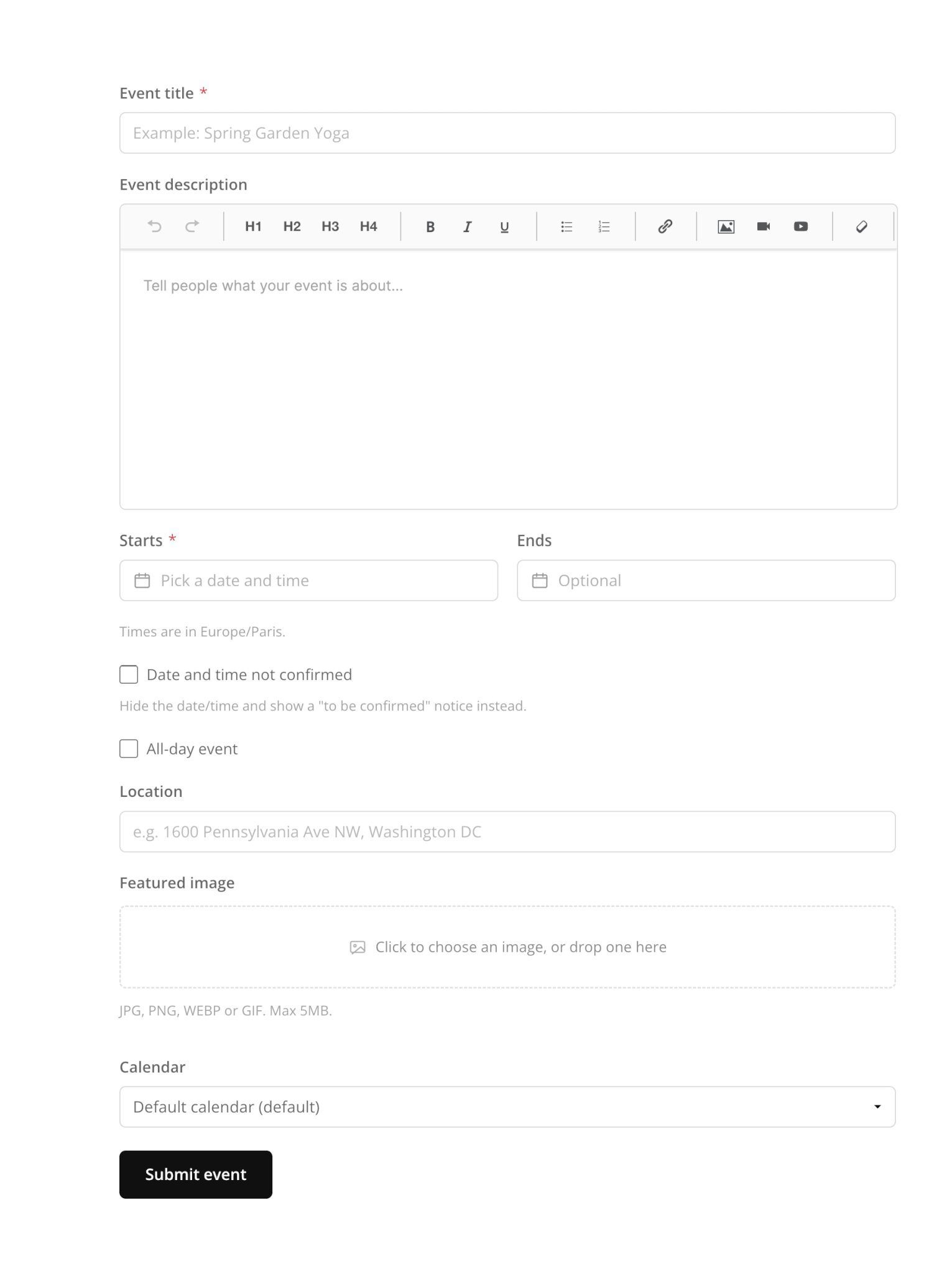
Visitors can now submit their own events straight from your site, with optional moderation, a full front-end form, and spam protection built in. If you run a community calendar or accept event listings from others, this is a big one.
The form is available as a block called EK Frontend submission or as a shortcode: [eventkoi_event_submission]
For developers: Use these docs to help you create your own form and map it to our event CPT:
Event Submission Field Reference and Frontend Event Submission with Gravity Forms
User permissions
You can now give specific WordPress roles access to just the parts of EventKoi they need (events, calendars, attendees, orders) without handing out the admin password. Find this in Events > Settings > User permissions.

Grouped dropdown custom fields
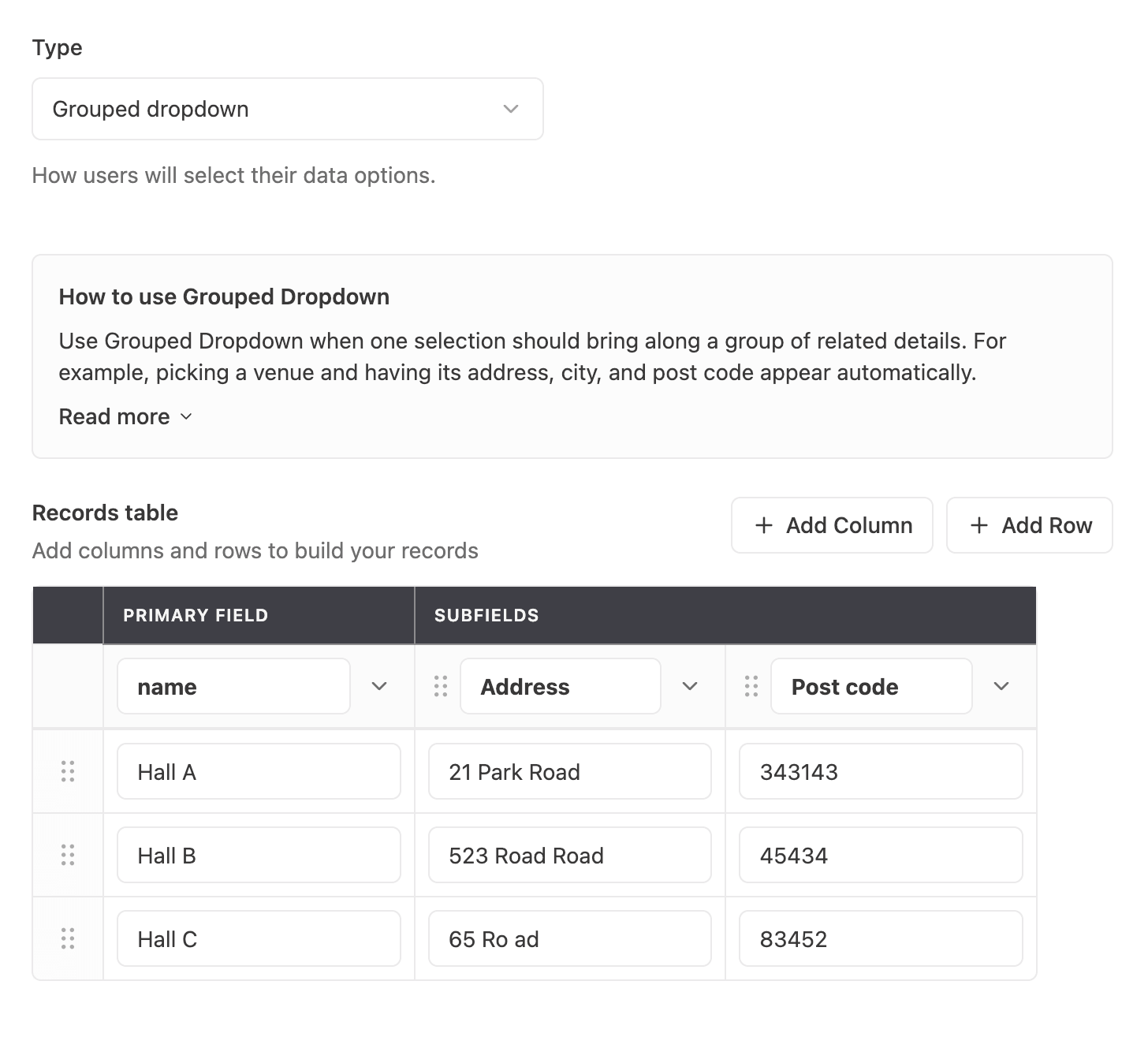
We also added a powerful custom fields type called “Grouped dropdown”. This lets you store a list of subfields under one primary field. For example, you can store a list of venues using the meeting room name as the primary field, along with the Address, Building name, Floor and unit number, Post code as subfields.
This way, you can pick from a dropdown list of meeting room names in the event settings. And on the frontend, it will display the full venue details.
This is also a useful feature for speaker details, venue rules, and much more.
What shipped in June
Here’s some highlights of what shipped in June. For full details of everything we’ve shipped, check out our changelog.
Calendar List view
A new option alongside Month and Week, you can now also view events as a list.

Subscribe to a whole calendar
Another big feature for calendars is the ability to subscribe to a calendar. This allows visitors to add the calendar to their own Google, Apple or Outlook calendars.
This is useful if you have a community calendar and you want to allow community members to stay up to date with what’s going on without having to constantly come back to your site.

Required Terms & conditions at checkout
You can now add multiple required terms and conditions at checkout.

Reschedule individual recurring event instances
Previously, you could only change the event details of an instance – like the location, description or image.
But what happens if you have a concert series scheduled for every Saturday, but on one particular week, the concert is happening on a Sunday instead?
Now, you can simply go into that particular instance, and change the date from a Saturday to a Sunday.

We’re ramping up YouTube
If you haven’t already, subscribe to us on YouTube @eventkoi. We’re putting a lot more into video from here on, tutorials, walkthroughs, real setups.
Our latest video walks through building a webinar page that updates itself automatically every time you add a new event, using EventKoi’s custom fields and Elementor’s Loop Grid. Once it’s built, adding a new webinar is the only step left, no manual page edits, no button updates. You can watch it here, or read the companion blog post.
What’s coming in H2
With the help of AI, we’ve managed to build most of the big foundational features we wanted to build for EventKoi. This includes recurring events, tickets and RSVP, and frontend submission forms.
Going forward, we want to make each of those features more robust, and building more integrations.
I’ll also be making more youtube content, growing our blog, and improving our documentation. If there are tutorials you’d like to see me make, please let me know.
Our goal is to make an events calendar plugin that’s modern, flexible and powerful, without the bloat.
Thanks for being here for the first half. Onwards.