

Eventbrite is a popular way to sell event tickets online, and for many organisers it works fine.
However, there are two common reasons people look elsewhere: fees and the fact that Eventbrite owns the relationship with your attendees, not you.
This page compares seven alternatives on what a $20 ticket costs to sell, where the checkout lives, and which alternative suits which kind of person best.
Why organisers look for an Eventbrite alternative
As of October 2026, Eventbrite charges a service fee of 3.7% plus $1.79 on each paid ticket, plus a 2.9% payment processing fee per order. Buyers pay those fees by default, or you can absorb them. Free events cost nothing.
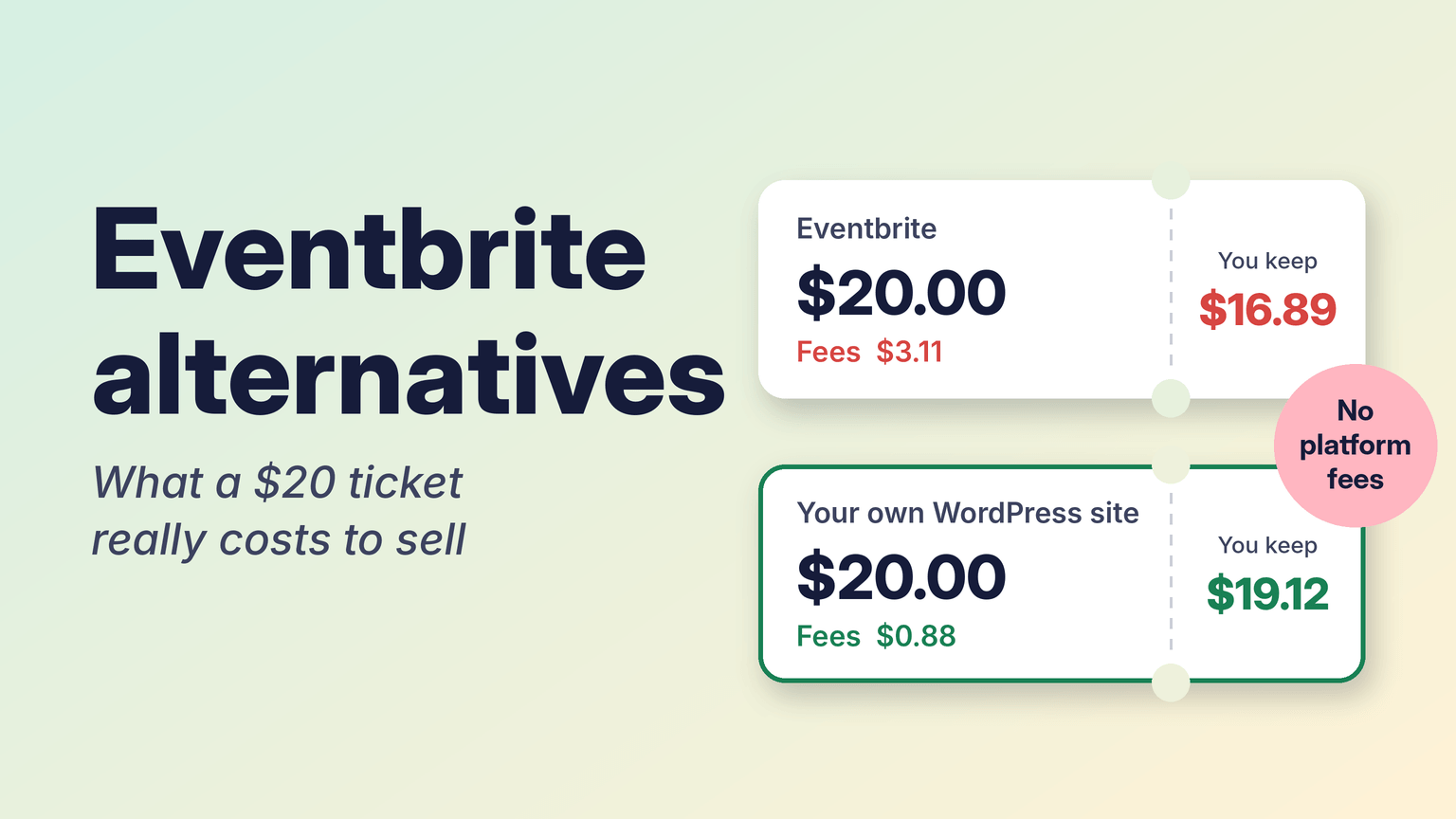
On a $20 ticket that comes to $3.11. Your buyer sees a $23.11 total, or you keep $16.89 if you absorb it. On cheap tickets the fixed $1.79 is a large share of the price, which is why community events, classes and small workshops feel it most.
The other reason is control. Your event page sits on eventbrite.com next to other organisers’ events, and your buyers become Eventbrite users who receive Eventbrite’s recommendations. If you already have a website and a mailing list, you may want people to buy on your site in order to maintain control of your attendee’s relationship and experience.
Lastly, Eventbrite also changed hands this year: Bending Spoons, which owns Meetup, Vimeo and Evernote, completed its acquisition in March 2026. This has yet to result in any pricing changes, but this is something worth watching out for.
What a $20 ticket costs on each platform
Every row uses the platform’s published US pricing as of October 2026 and Stripe’s standard US card rate of 2.9% plus 30 cents where a separate processor applies. Subscriptions and licences are listed separately because they do not change per ticket.
| Platform | Fees on a $20 ticket | You keep (fees absorbed) | Fixed cost | Checkout lives on |
|---|---|---|---|---|
| Eventbrite | $3.11 | $16.89 | None | Eventbrite (embed available) |
| EventKoi Pro | $0.88 (Stripe fees, not platform fees) | $19.12 | $99/year, 1 site | Your WordPress site |
| EventKoi Lite | Your WooCommerce payment gateway’s fee | About $19.12 with Stripe | Free | Your WordPress site |
| Event Tickets (free) | $1.28 (2% fee plus Stripe) | $18.72 | Free | Your WordPress site |
| Event Tickets Pro (The Events Calendar) | $0.88 (Stripe fees, not platform fees) | $19.12 | $399/year | Your WordPress site |
| Luma (free plan) | $1.88 (5% platform fee plus Stripe) | $18.12 | None | Luma |
| Luma Plus | $0.88 (Stripe fees, not platform fees) | $19.12 | $59/month, billed annually | Luma |
| Humanitix | $2.29 | $17.71 | None | Humanitix (website widget available) |
| Ticket Tailor | $1.73 ($0.85 plus Stripe) | $18.27 | None, or prepaid credits from $0.30 per ticket | Ticket Tailor (embed available) |
| TicketSource | $1.69 (3.5% plus $0.99, processing included) | $18.31 | None | TicketSource |
| Zeffy (nonprofits only) | $0 | $20.00 | None | Zeffy |
The fixed costs matter at low volume. If you sell 45 x $20 tickets in a year on Eventbrite, your platform fees alone would cover the cost of 1 EventKoi Pro license!
The 7 alternatives
1. EventKoi: tickets on your own WordPress site

EventKoi is an events calendar plugin for WordPress. Events, ticket pages and checkout all live on your site, and buyers become your customers in your database. EventKoi takes no cut of ticket sales. You pay only your payment processor.
The free version, EventKoi Lite, sells tickets through WooCommerce checkout using whatever payment gateways you already have, so ticket orders are ordinary WooCommerce orders. EventKoi Pro ($99 a year for one site) adds a direct Stripe checkout with cards, Apple Pay and Google Pay that does not need WooCommerce, plus recurring events, editable ticket emails and page builder integrations for Elementor, Bricks, Divi and Beaver Builder. Both versions include multiple ticket types, capacity limits, sales windows, QR code check-in and attendee export.
Good for: organisers who already run a WordPress site and want the event page, checkout and mailing list in one place. Not a fit if you do not have a website, or if you depend on a marketplace to find new attendees. EventKoi does not list your events anywhere except your own site.
2. Ticket Tailor: low flat fees without a website

Ticket Tailor charges a flat fee per ticket instead of a percentage. As of October 2026 its US pricing is $0.85 per paid ticket on pay as you go, or from $0.30 per ticket if you buy credits upfront (minimum 100 credits). You also pay Stripe, PayPal or Square for processing. On a $20 ticket with Stripe, pay as you go comes to $1.73 in fees, so you keep $18.27. Free tickets cost nothing up to 5,000 a year, and registered charities get 50% off.
Good for: organisers without a website who want hosted event pages that look like their brand, and anyone selling higher-priced tickets, where a flat fee beats a percentage. You can embed the checkout on another site, but it is still a separate account and a separate customer list from your website.
3. Humanitix: fees that go to charity

Humanitix is a registered charity that gives its profits to education and health projects. As of October 2026 its US pricing is 2.1% plus 99 cents per paid ticket, plus 2.9% plus 30 cents processing. Charities and schools pay 1% plus 99 cents. Every plan includes every feature, including reserved seating and a website widget.
Good for: organisers who would rather their ticket fees fund something they care about, and charities and schools with the discounted rate. On a $20 ticket it costs less than Eventbrite, but more than the flat-fee and self-hosted options.
4. Luma: free plan for community events

Luma is an event platform built around guest lists, invitations and reminders. As of October 2026 the free plan allows unlimited events and guests and takes a 5% platform fee on paid tickets, on top of Stripe. Luma Plus costs $59 a month (billed annually) and removes the platform fee, adds a custom URL for event pages and raises the invite limit to 5,000 a week.
Good for: free and low-cost community events where the guest list, approvals and email reminders matter more than branding. Luma Plus pays for itself once you sell more than about $1,200 of tickets a month. Event pages live on Luma, not your site.
5. Event Tickets by The Events Calendar: the established WordPress option

If you run WordPress, the other common route is Event Tickets from The Events Calendar team. The free plugin sells tickets through its own Tickets Commerce checkout with Stripe or Square, and as of October 2026 its documentation says a 2% fee applies to those sales on the free version. On a $20 ticket that is $0.40 on top of Stripe’s fee, so you keep $18.72.
Upgrading removes the 2% fee. The Pro plan costs $399 a year and adds WooCommerce integration, custom registration forms and a QR check-in app. The $599 Elite plan adds reserved seating and email campaigns.
Good for: sites already built on The Events Calendar, and larger venues that need assigned seating. The Pro plan costs four times EventKoi Pro for a single site. We compare the two plugins in detail in EventKoi vs The Events Calendar.
6. TicketSource: one fee that includes card processing

As of October 2026, TicketSource US pricing is 3.5% plus $0.99 per paid ticket, including card processing. If you connect your own Stripe account, it charges $0.99 per paid ticket and Stripe bills you separately. On a $20 ticket that is $1.69 with TicketSource’s processing, or $1.87 with your own Stripe account. Free events and in-person bookings have no fee, and there are no contracts.
Good for: organisers who want one all-in fee and no setup cost. The 3.5% grows with the ticket price, so on more expensive tickets it costs more than a flat-fee platform like Ticket Tailor.
7. Zeffy: free ticketing for nonprofits

Zeffy charges nonprofits nothing, including card processing. It is funded by optional tips that buyers can add at checkout. Alongside ticketing it handles donations, raffles, auctions and memberships.
Good for: registered nonprofits running fundraising events. It only serves nonprofits, and buyers see the optional tip at checkout, so make a test purchase to see what your attendees will see.
Which one should you pick?
- You have a WordPress site and want tickets sold there: EventKoi, or Event Tickets if you already use The Events Calendar or need assigned seating.
- You have no website and want low fees: Ticket Tailor.
- You run community meetups with lots of free RSVPs: Luma.
- You are a registered nonprofit: Zeffy, or Humanitix at its charity rate.
- You want one all-in fee with card processing included and no upfront cost: TicketSource.
When Eventbrite is still the right choice
Eventbrite’s marketplace is its biggest selling point. It reports around 89 million monthly users, and people browse it to find something to do each weekend. If most of your buyers discover you on Eventbrite, your fees are partly paying for that reach. Some organisers keep Eventbrite for discovery and sell to their returning audience on their own site.
Fees at a glance
| Platform | Fees on a $20 ticket | You keep (fees absorbed) | Fixed cost | Checkout lives on |
|---|---|---|---|---|
| Eventbrite | $3.11 | $16.89 | None | Eventbrite (embed available) |
| EventKoi Pro | $0.88 (Stripe fees, not platform fees) | $19.12 | $99/year, 1 site | Your WordPress site |
| EventKoi Lite | Your WooCommerce payment gateway’s fee | About $19.12 with Stripe | Free | Your WordPress site |
| Event Tickets (free) | $1.28 (2% fee plus Stripe) | $18.72 | Free | Your WordPress site |
| Event Tickets Pro (The Events Calendar) | $0.88 (Stripe fees, not platform fees) | $19.12 | $399/year | Your WordPress site |
| Luma (free plan) | $1.88 (5% platform fee plus Stripe) | $18.12 | None | Luma |
| Luma Plus | $0.88 (Stripe fees, not platform fees) | $19.12 | $59/month, billed annually | Luma |
| Humanitix | $2.29 | $17.71 | None | Humanitix (website widget available) |
| Ticket Tailor | $1.73 ($0.85 plus Stripe) | $18.27 | None, or prepaid credits from $0.30 per ticket | Ticket Tailor (embed available) |
| TicketSource | $1.69 (3.5% plus $0.99, processing included) | $18.31 | None | TicketSource |
| Zeffy (nonprofits only) | $0 | $20.00 | None | Zeffy |
Try selling tickets on your own site
If you run WordPress, you can install EventKoi Lite for free and sell tickets through your existing WooCommerce checkout. To see the Stripe checkout, recurring events and page builder templates first, open the EventKoi Pro demo, a live WordPress site with no signup required.