
Overview
This guide documents how you can set attributes for EventKoi’s calendar in list view using its shortcode.
This is the base shortcode:
[eventkoi_calendar display="list"]Supported attributes (list view)
| Attribute | Type | Default | Accepted values | What it does |
|---|---|---|---|---|
id | string | Default calendar | Calendar ID ("2"), comma-separated IDs ("2,5,8"), or "all" | Chooses which calendar(s) to query. |
display | string | "calendar" | For this doc: "list" | Switches to list mode. |
orderby | string | EventKoi Lite: "date_modified". EventKoi Pro: "upcoming" | upcoming, date_modified, publish_date, title, event_start, past_events | Sort field. publish_date maps to publish date, and event_start sorts by the event start datetime. |
order | string | EventKoi Lite: "desc". EventKoi Pro: "asc" | asc, desc | Sort direction. If orderby="upcoming" and order is omitted, it auto-defaults to asc in both tiers. |
per_page | int | 10 | 1 to 100 | Batch size per list request / load chunk. |
max_results | int | 0 | 0 to 1000 | Hard cap on total returned items. 0 means no cap. |
load_mode | string | "pagination" | pagination or infinite | Note: This is an EventKoi Pro feature. Controls how visitors move through the list once it exceeds one page. pagination shows Prev/Next page controls. infinite loads more events automatically as the visitor scrolls. |
date_start | date string | empty | YYYY-MM-DD | Only include items starting on/after this date. |
date_end | date string | empty | YYYY-MM-DD | Only include items starting on/before this date. |
expand_instances | bool | empty | 1/0, true/false, yes/no, on/off | Expands recurring events so each occurrence is listed separately, rather than just the series. |
expand | bool | empty | Same as expand_instances, or bare expand with no value | Back-compat alias for expand_instances. A bare expand (no value at all) is treated as true. If both expand and expand_instances are set, expand_instances wins. |
filter | bool | Uses the calendar’s own “Show filters” setting | 1/0, true/false, yes/no, on/off | Note: This is an EventKoi Pro feature. Shows or hides the visitor-facing filter row above the list, with a dropdown per calendar and per taxonomy in use. Must be given an explicit value; a bare filter with no value is ignored. |
taxonomies | string | empty | See “Filtering by taxonomy” below | Note: This is an EventKoi Pro feature. Restricts the list to only events tagged with the terms you specify, whether or not the filter row is shown. |
Filtering by taxonomy
Note: Custom taxonomies are an EventKoi Pro feature. The taxonomies attribute has two forms.
You can show the taxonomy, “location”, and set it to display either location id 12 or 14:
taxonomies="location:12,14"You can also just use the taxonomy slug as the attribute directly. And also use the term slug:
location="toronto,ottawa"You can also list multiple taxonomies. When listing multiple taxonomies, both taxonomy’s conditions must be satisfied. In the following example, the event calendar list will only display events on the topic 3 that are taking place in either location 12 or 14.
taxonomies="location:12,14;topic:3"Examples
Basic list
[eventkoi_calendar id="2" display="list"]All calendars, nearest upcoming first
[eventkoi_calendar id="all" display="list" orderby="upcoming" order="asc"]Date-windowed list
[eventkoi_calendar id="all" display="list" orderby="upcoming" order="asc" date_start="2026-06-01" date_end="2026-06-30"]Expand recurring instances
[eventkoi_calendar id="2" display="list" orderby="upcoming" order="asc" expand_instances=1]Limit loaded results
[eventkoi_calendar id="all" display="list" per_page="20" max_results="200"]Infinite scroll instead of pagination
Note: load_mode is an EventKoi Pro feature.
[eventkoi_calendar id="2" display="list" load_mode="infinite"]Only show events tagged with either of two locations
Note: taxonomy filtering is an EventKoi Pro feature. Requires taxonomies to be set up first.
[eventkoi_calendar id="2" display="list" taxonomies="location:12,14"]Same, but also show the filter row
Note: filters are an EventKoi Pro feature.
[eventkoi_calendar id="2" display="list" taxonomies="location:12,14" filter="on"]Behavior notes
idis optional. If omitted, EventKoi uses the default calendar.id="all"fetches events across all calendars.- The default
orderbyandorderdiffer by tier: EventKoi Lite defaults todate_modified/desc, EventKoi Pro toupcoming/asc. Set both explicitly if you want the same behaviour on either tier. - Invalid
orderbyfalls back toupcoming. - Invalid
orderfalls back toasc. per_pageandmax_resultsare clamped for safety (100and1000max).- Invalid
load_modefalls back topagination. date_startanddate_endshould always beYYYY-MM-DD.- For recurring events, use
expand_instanceswhen you want each occurrence listed separately.expandstill works as an alias for backwards compatibility. - A taxonomy with an empty term list in
taxonomiesis ignored rather than emptying the list, so clearing a filter never accidentally hides everything.
Shortcode maker
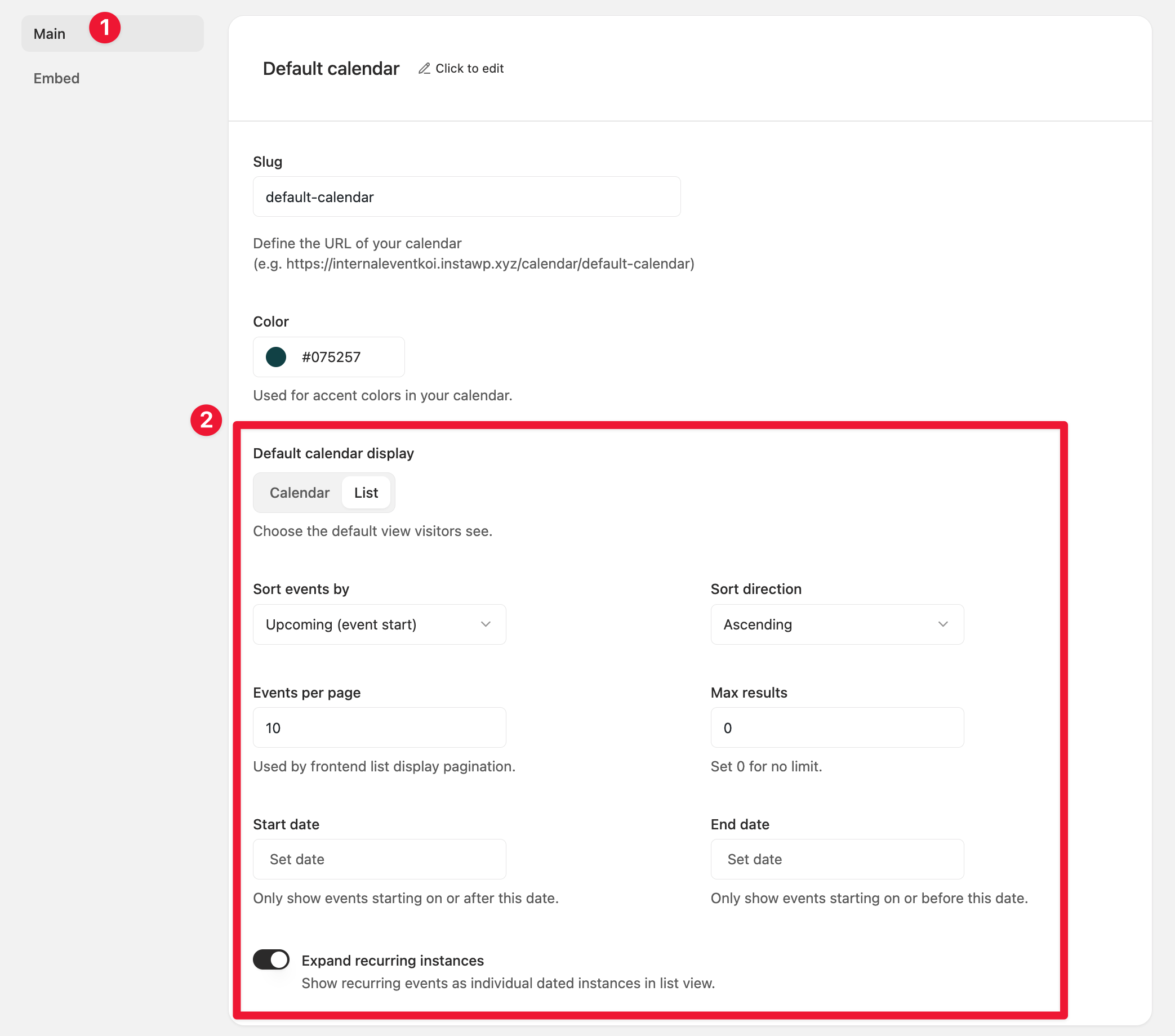
You can create an event calendar list shortcode by heading to Events > Calendars. Then selecting the calendar you want to edit.
In this example, we will create a shortcode for the Default calendar.
In the Calendar settings Main tab, select the following settings:
- Default calendar display: Select list
- Sort events by
- Sort direction
- Events per page
- Max results
- Start date
- End date
- Expand recurring instances
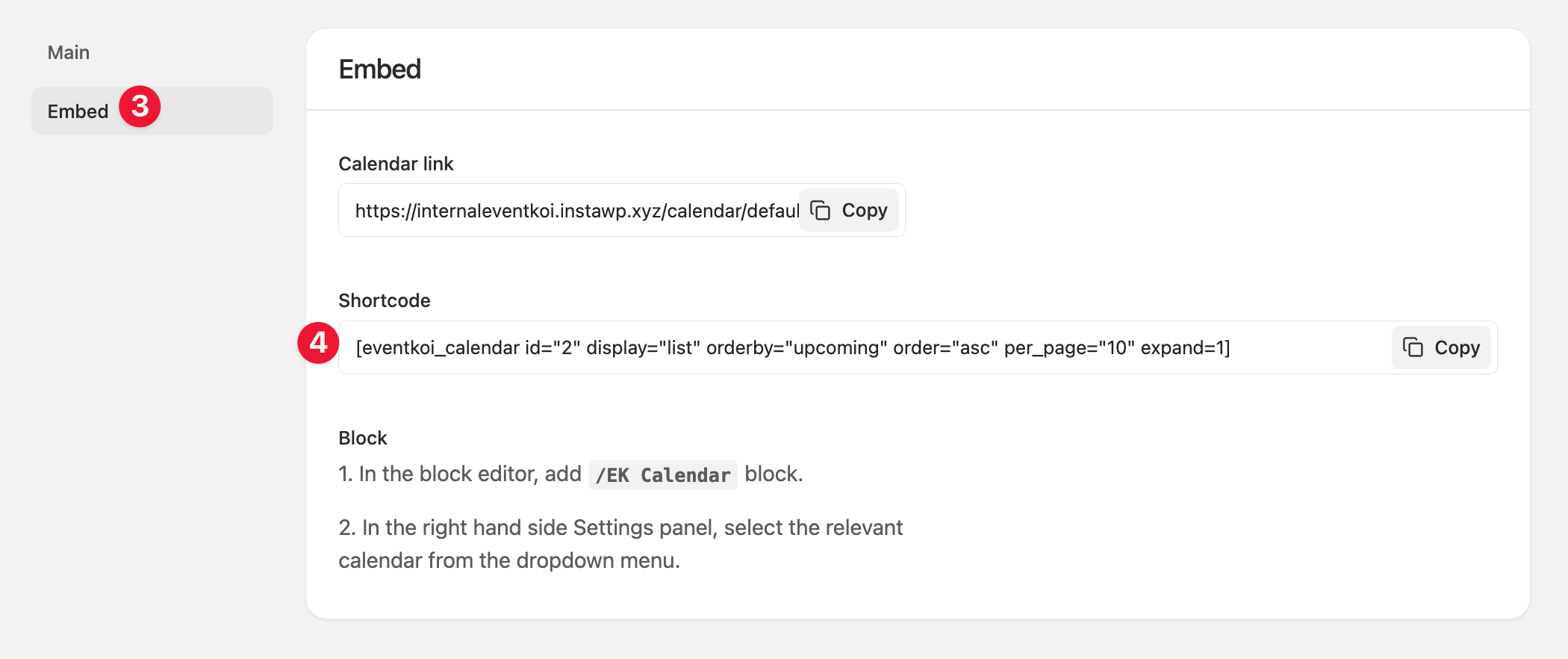
Then go to the Embed tab. There you’ll see the shortcode based on the settings you created in the Main tab. You can copy it and paste the shortcode any where you like.
More shortcodes
For the full list of EventKoi shortcodes, see EventKoi Shortcodes Reference Guide: Start Here.